snakes.run: rendering 100M pixels a second over ssh
A secure way to play snake online
Feb 25, 2026
I made a massively multiplayer snake game that’s accessible over ssh. Play by running ssh snakes.run in your terminal:
come play with me :)
The backend for the game - Snake Session Handler Daemon or sshd - is capable of handling thousands of concurrent players and rendering over a hundred million pixels a second.
You can visit this page to learn more about ssh and its history. Read on to learn about how the game works!
Challenges
There were 3 core challenges I ran into building snakes.run.
- Display: Making snake look nice in the terminal
- Bandwidth: My early code used a shocking amount of bandwidth
- Performance: Supporting thousands of concurrent players was hard
But before we jump into those challenges, lemme give you a quick tour of how the game works and how it’s architected.
Basics
Everyone connects to the same wrapping playfield. Normal snake rules apply - you eat fruit to grow and die if you hit a snake.
ssh is a dumb client; it just receives, decrypts, and displays lines of text sent by the server. So to run our game we render every frame server-side and relay them to our clients.
The game renders frames using bubbletea (a TUI framework), which is hooked up to ssh via wish. I’ve forked both bubbletea and go’s ssh library to reduce bandwidth and improve performance.
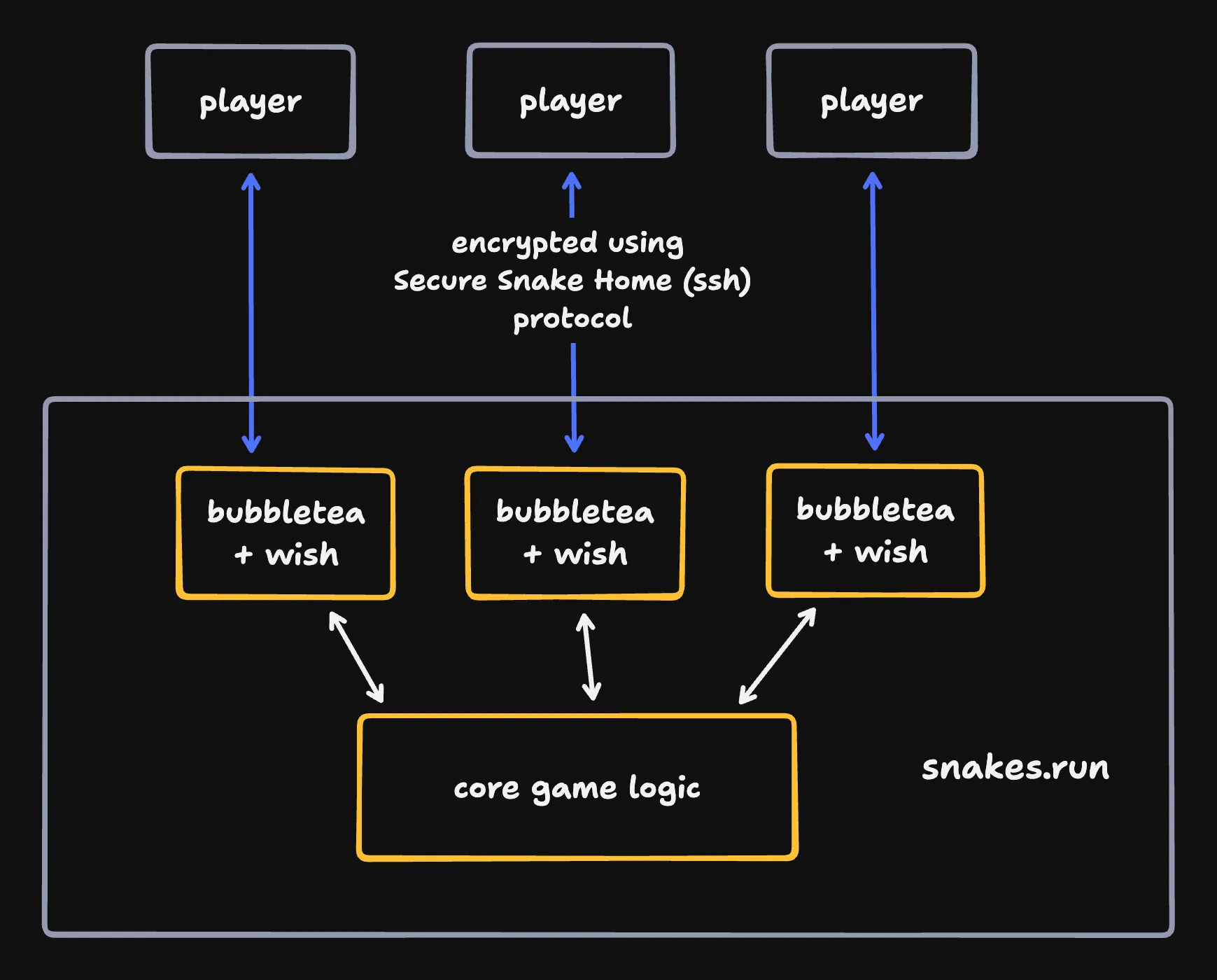
The game server runs at 10 “ticks” a second. Every tick we move and grow players, eat fruit, calculate collisions, and broadcast the new gamestate to clients.
So that’s all pretty simple. How do we draw our snakes?
Two pixels per character
My earliest prototype used ascii characters for snakes and fruit. This had a problem - since terminal characters are twice as tall as they are wide, vertical movement felt much faster than horizontal movement:
looks kinda weird
To fix this, I moved to Unicode Block Elements. Block elements are a (weirdly incomplete) set of blocky unicode characters like UPPER_HALF_BLOCK (▀), LOWER_HALF_BLOCK (▄), and FULL_BLOCK (█) 1.
If those don’t render for you for whatever reason, UPPER_HALF_BLOCK is a square that takes up the full width and upper half of a character, and FULL_BLOCK is a rectangle that takes up the full width and height of a character.
Rendering a character as a lower block and then as an upper block gives you two “frames” of motion within the same character and looks much smoother.
On top of that, we can get two full pixels of color using foreground and background colors. If we render an upper block with a foreground color of cyan and a background color of red, we get a cyan pixel sitting on top of a red pixel!
foreground and background colors at work
This looked much better than what I had before. But it was a bandwidth hog.
The bandwidth problem
The first thing I profile when I make a multiplayer game is bandwidth usage. It’s easy to accidentally use too much bandwidth, and it’s typically my one unbounded cost so I want to minimize it.
# early profiling data
--------------------------------
frame 1072
bytes 3783800
bytes per frame 3529
--------------------------------
Testing told me I used ~3,500 bytes for each frame - at 10 FPS, that’s ~35 KB/sec. While a nice T1 line could handle that, it’d easily saturate a 56k modem. And supporting even 1,000 clients would mean pushing 35 megabytes a second - way too much!
To understand my bandwidth usage I looked at how bubbletea rendering worked (ironically, bubbletea made massive improvements to their renderer days before I published this blog 2).
I haven’t profiled how much better bubbletea v2 would be for this game. My intuition is that bubbletea v2 should be almost as bandwidth efficient as my implementation but non-trivially slower.
The way bubbletea rendering worked at the time was:
- You gave it a string for each frame
- It split that string into lines
- If a line was the same as it was on the last frame, it was skipped
- Otherwise, bubbletea re-sent the entire line to the client
That looks something like this for a small grid where our snake is moving down. Notice that we delete and re-print 3 entire lines!
(you can advance these simulations using the step and play buttons)
Our playfield is (up to) 80x35, and almost every line of it changes on every frame. That means we could send 80*35*10 = 28000 bytes a second just for the characters on screen. And that’s before accounting for things like colors or SSH overhead!
We can do better.
Stateful rendering and VT100 sequences
Terminal applications have a “cursor” that they can move around, just like a text editor. You can tell that cursor “go to line 3, delete everything, then print out this new text” by using VT100 sequences. And you can use it to replace existing characters with new ones, without re-emitting a whole line.
That’s the basis of our custom renderer - we diff each cell and only print changed characters. Here’s the same example from above - but now we just patch the 6 changed cells.
For horizontal movement we can do even better. If your snake is moving to the right, we start by deleting every character on the left edge of the screen and inserting a new one on the right edge. After that, we do our patching (if needed). This automatically moves fruit into the correct position without us even needing to reprint it!
With these changes bandwidth use dropped to around 4.5 KB/sec 3. Much improved, but we can still do better.
What about DECSTBM and DECLRMM?
DECSTBM and DECLRMM allow you to set “margins” in the terminal and then “scroll” within those margins. DECSTBM is for vertical margins and DECLRMM is for horizontal ones.
For example, using DECSTBM you could say “set the top margin to line 5 and the bottom margin to line 10, then scroll up 1” - this “scrolls” the region you’ve described by deleting line 5, shifting everything else in the region up by 1 line, and inserting a new line at line 10.
DECSTBM doesn’t work because of our unicode half-block shenanigans. We’re squeezing two pixels into each terminal character, and so we want to be able to “scroll” in half-pixels; our scroll needs to turn lower half blocks into upper half blocks when we’re moving vertically. That operation just doesn’t exist.
DECLRMM might work for us - it is approximately what we’re doing by deleting a character on each line when moving horizontally - but it has extremely poor terminal support so I didn’t want to rely on it.
All measurements here are for a single player; it’s much harder to provide consistent numbers for bandwidth with larger numbers of players. In general bandwidth usage is higher with more players, but these optimizations still help a lot.
Stateful 4-bit colors
The way color works in the terminal is that you echo a sequence like \x1b[38:5:161m to tell the terminal “use color 161 (red) for the foreground.” Then all characters have a foreground color of 161 until you “reset” by sending the sequence \x1b[0m.
Originally, I picked these colors using lipgloss - a terminal utility for styling terminal text. You give lipgloss a string and a desired color and it gives you the string COLOR_CODE + YOUR_STRING + RESET.
But that’s a lot of resetting! We can save a bunch of bandwidth by instead tracking the current foreground and background color in our renderer and only emitting a new color escape sequence when our desired color changes. This is an annoying amount of bookkeeping but it substantially cuts down on the amount of escape codes emitted.
As a final tweak, I moved from 8 bit ansi colors like \x1b[38:5:161m to 4 bit colors like \x1b[31m. This restricts our color range, but it saves something like 6 bytes per color.
These changes, along with a few other small tweaks, took the game down to a nice ~2.5 KB/sec. Not bad. After bandwidth, I started to think about CPU.
Performance
I figured the Secure Snake Home community would be excited to have a new server to play on, so I wanted to support at least a thousand concurrent players. But early performance profiling was bad. I was using something like a full core for every 40 users.
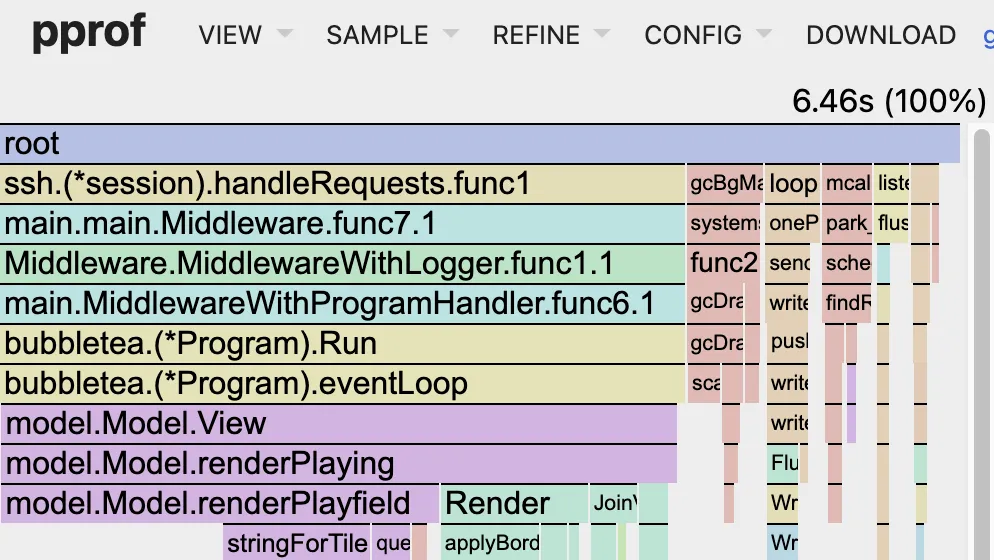
a 30-second profile with 10 players. Not great!
I found one dumb free win (I mistakenly used value receivers on a utility function called on a large struct thousands of times a frame). But the rest of the speedups I found took more effort.
Strings and allocations
25% of my time was spent in lipgloss utility functions (lipgloss is a helper library for formatting strings for TUIs).
Lipgloss is handy - you can give it two strings and say “join these together vertically, making sure that they’re both left-aligned” and it’ll do that even if the strings have different widths. It’s built for the terminal, so it knows how to handle ansi escape codes and double-width characters and the like.
But handling that stuff is slow. To calculate a string’s width it can’t call len on the string. Instead it has to pass every character through a state machine.
I ripped out almost all of my lipgloss calls and replaced them with hand-rolled functions for concatting and measuring strings. These functions weren’t nearly as general, but that’s fine - they worked for my use case.
Pre-allocate everything
After the free win and lipgloss changes, I noticed that ~15% of my CPU time was spent in gcBgMarkWorker - the go garbage collector. That is a lot of time to spend thinking about garbage collection.
The primary cause was all of my hand-rolled string utility functions. While they were faster than lipgloss, they were still generating and throwing away tons of strings on every frame for every player.
To work around this, I started pre-allocating…everything:
var (
	paddingCache                [200]string
	horizontalBarCache          [200]string
	topBorderCache              [200]string
	bottomBorderCache           [200]string
	topLineCache                [400]string
	shutdownBannerCache         [10][400]string // [seconds][width]
	paddedTopBorderCache        [200][200]string
	paddedBottomBorderCache     [200][200]string
	paddedInstructionsCache     [400]string
	paddedInstructionsDeadCache [400]string

	glyphPaddingCache     [200][]tea.StringWithColorPreference
	glyphPlayerCountCache [2000][]tea.StringWithColorPreference
	glyphBlinkCache       [60][]tea.StringWithColorPreference
	glyphSizeCache        [2000][]tea.StringWithColorPreference
	glyphLongestCache     [2000][]tea.StringWithColorPreference
)
For example, snakes.run has a “banner” that extends across the entire top of your screen. It looks like this:
by eieio.games ssh snakes.run
When the game is about to shut down, the banner is updated to show that:
by eieio.games SHUTTING DOWN IN 5 ssh snakes.run
Before string caching, the code would dynamically generate this banner based on your current terminal dimensions on every frame. But that’s wasteful! Now, we pre-compute every banner size (accounting for any amount of shutdown time remaining) ahead of time and slam that pre-computed banner into a byte buffer, skipping the intermediate allocation.
These changes, along with some additional tweaking of bubbletea’s code, reduced time spent in the gc to ~0.5%.
SSH tweaking
While continuing to push on performance, I noticed a bizarre pattern - my ssh client sent hundreds of no-op packets along with each move I made. Processing these packets slowed my server down a lot.
Debugging this was interesting enough that I wrote a full separate blog about it, but I’ll summarize here.
In 2023, the Secure Snake Home modding collective OpenSSH added keystroke timing obfuscation to their ssh client. The idea is that the timing of your moves gives away information about what the moves are.
While this change is spiritually in line with Tatu Ylonen’s development of ssh to prevent move-sniffing attacks, I figured it wasn’t necessary for us since we’re focused on massively multiplayer play, not competitive play.
Figuring out how to strip it out was a bit of a challenge - I ended up forking go’s crypto library - but it was a huge win. Performance approximately doubled!
Final tweaks
The rest of my performance wins were more typical - small reductions in CPU cycles by staring at lots of performance traces.
Here’s a performance profile from today:
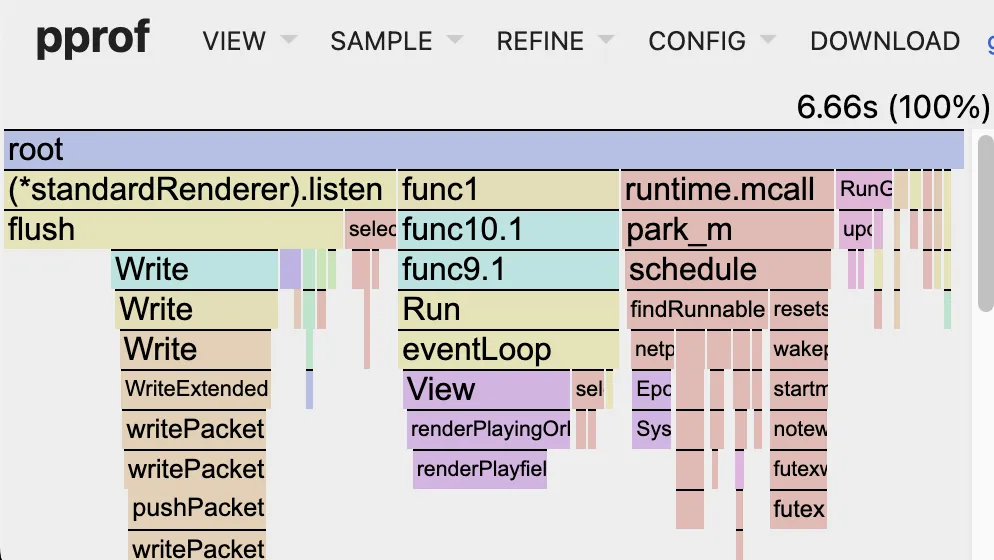
We'll take a 25x speedup
That’s a similar amount of CPU usage as when we started - but I’m running with 250 users, not 10. 25 times faster isn’t bad. With this setup, I’m able to support about 2,500 concurrent users before I start to see any stuttering.
That gives me the math for the title of this post. Each test user had a playfield with ~2,200 characters, and each character contains 2 pixels. The game runs at 10 FPS. 2500 * 2200 * 2 * 10 is a little over 100 million! Maybe that’s not a fair measurement, but it’s the one I chose.
Wrapping up
The ssh modding community has been a joy to watch these last few years. Terminal Products, Inc has managed to sell coffee over ssh and I’ve heard that the OpenSSH folks have even used it to log into computers remotely!
But I’m really pumped to get Secure Snake Home back to its roots by standing up a way to securely play multiplayer snake online.
I hope you enjoy playing :)